Just want to be honest with you straight from the get-go. I work with AI APIs a whole lot – Claude, GPT-4, Gemini and more. What I wasn’t doing is paying attention to one major waste of money – overlong prompts.
Now, don’t worry, nothing sinister, nothing broken – it was simply too verbose. Prompts packed with superfluous text, useless white space, verbose language, and filler that serves no purpose other than to cost you more on your API usage fees.
But all of that changed once I started taking prompt compression seriously. And now that we have the Compress functionality on our Surge AI Prompt Cleaner site, I’ll show you what it can do, why it’s so important, and how to make it work for you.
The Problem: Token Bloat Is Real, and It’s Expensive
Whenever you provide any kind of prompt to an AI model, such as GPT-4o, Claude 3, or even Gemini 1.5, there is an associated cost in terms of tokens. Tokens equate to about three to four letters. This means that if you use a 2,000-token prompt and make API calls ten thousand times in a day, the amount spent on input tokens would be substantial.
However, what if there is excess information in your prompts? Too many spaces. Duplicates. Escape sequences that found their way into your templates. Instructions that are excessively verbose and wordy.
That’s the hidden tax most developers never think to audit.
Here are the real-world things that bloat prompts silently:
- Copy-pasted text from documents that carries hidden whitespace and formatting
- Multi-line system prompts with generous spacing “for readability” that AI doesn’t need
- JSON payloads with pretty-printed formatting sent as-is to the API
- Repeated context that could be summarised or stripped
- Escape characters like
\n,\t,\\, and\"scattered throughout
None of these break your prompts. They just make your prompts heavier than they need to be — and in a token-priced world, heavier means more expensive.
What Is AI Prompt Compression?
AI prompt compression is the process of reducing the number of input tokens in a prompt without meaningfully degrading the output quality.
Think of it the way you think of image compression. A 10MB JPEG and a 1MB JPEG of the same photo can look virtually identical to the human eye. The data that was stripped out wasn’t load-bearing. Prompt compression works on the same principle — identify and remove the linguistic and formatting overhead that contributes tokens but not meaning.
There are a few ways this gets done:
1. Whitespace and formatting removal — Collapsing extra spaces, stripping line breaks, removing indentation from JSON. These are “free” savings — zero semantic loss.
2. Escape character cleanup — Removing or normalising \n, \t, \\, and \" sequences that sneak into prompts and add unnecessary token weight.
3. Text simplification — Shortening verbose phrases. “In order to be able to achieve the goal of” → “To”. “Please make sure that you” → “Ensure”. This is where real token savings compound.
4. Redundancy trimming — If you’ve said something twice in a prompt (which happens a lot with templates stitched together from multiple sources), compression catches that.
Done well, this can reduce your prompt size by 20–50% without your AI model noticing the difference in output quality.
Introducing the New Compress Feature on Surge
We just shipped the Compress workflow to surge.edu.lk, and I want to give you a proper tour of how it works.
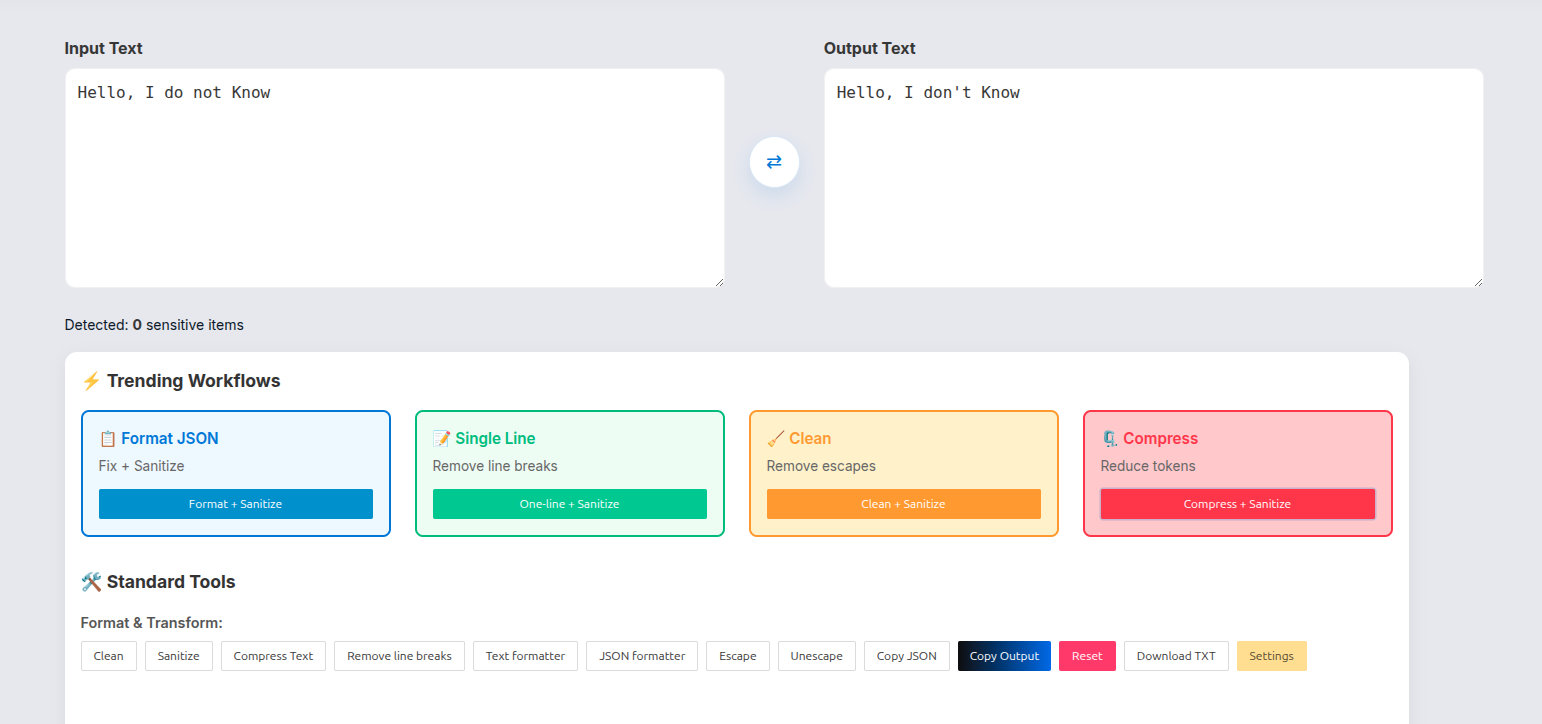
When you open the tool, you’ll see four Trending Workflows at the top:
- 📋 Format JSON — Fix + Sanitize
- 📝 Single Line — Remove line breaks
- 🧹 Clean — Remove escapes
- 🗜️ Compress — Reduce tokens ← this is the new one
Hit Compress + Sanitize and you’re running both token reduction and prompt sanitization in a single pass. That combination matters — more on that below.
How to Use It: Step by Step
Step 1: Paste your prompt into the Input Text box.
This could be a system prompt from your application, a raw prompt template, a JSON payload from your logs — whatever you’re actually sending to the AI.
Step 2: Click “Compress + Sanitize”
The tool will process your text and output the compressed version on the right side.
Step 3: Check the stats at the bottom
You’ll see Chars, Words, and Tokens for your output. Compare that to what you started with — that delta is your savings, every single API call.
Step 4: Use the Prompt Savings Calculator
This is where it gets tangible. Scroll down to the Prompt Savings Calculator (currently in beta), enter your daily request volume and choose your cost preset (or enter a custom cost per 1k tokens), and the tool tells you:
- Tokens saved per request
- Cost saved per day
- Bandwidth saved per day
- CO₂ saved per day (yes, really — more on that)
Step 5: Copy or Download your compressed prompt
Hit Copy Output or Download TXT and drop it into your application.
That’s it. No account, no server-side processing, no data leaving your browser.
Token Server via Prompt Compression: What It Means for Production Apps.
Here’s a concept I want to explain properly because it’s one of those things that sounds technical but is actually very straightforward once you see it.
Token Server via Prompt Compression refers to an optimisation layer that sits between your application and the LLM API.
Here’s the flow without it:
Your App → [Raw, uncompressed prompts] → LLM API → Response
Here’s the flow with it:
Your App → [Compress prompts] → LLM API → Response
The compression step happens before tokens are counted and billed. That’s the whole game. You pay for what you send, so send less.
For a small weekend project, this might save you a few cents. For a production application making 50,000 API calls per day, this is the difference between a manageable infrastructure cost and one that causes real budget pain.
The Surge Compress tool is designed to serve this use case. You can:
- Run a bulk compression pass on your prompt templates before deploying them
- Use the tool as a QA step whenever you update your system prompts
- Paste in API logs and compress the prompts to audit how lean your production prompts actually are
Why it’s so important to perform the Sanitize step correctly (and don’t forget it!)
There is a reason for the Compress + Sanitize combo. By compressing the token overhead, you will also want to make sure that you do not accidentally leak confidential information about the user.
The Sanitize step within Surge will check for and manage:
- Email addresses
- URL and IP addresses
- Telephone numbers and IBANs
- API keys and other credentials
- Personal names, locations and company names (NLP based checks)
This is critical if you are developing applications where user data may pass through your prompts. You want to ensure that before you compress and ship your application that your prompt includes no user email addresses or hard-coded API keys that are logged to a file.
The Realistic Mode for sanitizing is especially clever as it creates fake items to look like the sensitive item rather than replacing sensitive items with ugly placeholders like [EMAIL_1] – this allows you to keep your prompt structurally intact and therefore testable, whilst also removing the actual sensitive value from it.
The Environmental Angle: Reducing Datacentre Load
I want to point out something that surprised me when I saw the actual numbers.
The cost of doing AI inference is high; when you compare the amount of power that goes into running large GPU clusters as data centres to support LLM APIs (large language models), they consume quite a bit of energy. With one compressed prompt, there isn’t a ton of energy saved. However, with a lot of compressed prompts, you add up a lot.
You can now see the CO₂ saved daily estimate (from using compressed prompts) from the “Savings” calculator on Surge. Although the individual stats may seem small, they’re still real, and as you consider the scale of AI infrastructure at either a company and/or platform level, that number becomes important.
With shorter prompts, you will:
Reduce the amount of data transmitted over the network
Reduce the amount of tokens processed per inquiry
Reduce the amount of GPU compute done per call
Reduce the amount of energy consumed at inference layer
Reducing your costs is the main reason for compressing your prompts. However, this is also an ancillary benefit that I believe is worth highlighting.
Real Talk: When Does Compression Actually Help?
Various types of prompts get different amounts of compression benefits. Here’s a simple breakdown:
High Benefit Scenarios:
Long prompts (more than 200 tokens) and long copies
Prompts made up of many small pieces combined together
Heavy amounts of JSON data in pretty-printers
Prompts where being written by humans is the origin of the original prompt
Any prompt that has not been evaluated in some time
Low Benefit Scenarios:
Well-edited, small and tight prompts that you have previously worked through
Prompts that have intentional words, built around meaning
Creative writing prompts, where tone and style need to match up for each token.
The real answer is to copy your prompt in to the compression tool and see how many tokens can be saved. If your total savings is 5% then it will probably not save you enough time to change your work flow. If it saves you 35%, then maybe consider changing how you complete your work.
Final Thoughts
If you’re building anything with AI APIs and you haven’t audited your prompt token efficiency, there’s a very good chance you’re leaving money on the table every single day.
The new Compress feature on Surge AI Prompt Cleaner is free, runs in your browser, takes about 10 seconds to use, and now tells you exactly what you’re saving in tokens, cost, bandwidth, and even carbon.
There’s genuinely no reason not to try it on your next prompt.
Head over to surge.edu.lk, paste in whatever you’re currently sending to your LLM of choice, hit Compress + Sanitize, and see what the numbers say.
Leave a Reply