
Artificial intelligence models such as ChatGPT, Claude, Gemini, and Llama can create impressive content—however, a lot of times their output is disorganized, leaking escape characters, and cannot be directly used in code, APIs, or automation tools.
Have you ever taken a part of an AI output and found that:
\n\t\\\"- unnecessary line breaks
- random spaces
- broken JSON
Every day, the question of how to repair AI prompts from faulty outputs runs through the minds of a thousand developers, writers, and AI users. The lucky thing for you? There’s a way to do prompt cleaning and prompt repair automatically via an online tool, and you don’t have to write a single line of code.
This guide will walk you through the underlying reasons for the creation of such horrible prompts, the reason for the appearance of escape characters, and methods for prompt cleaning by means of short, user-friendly toolkits.
Why AI Prompts Become Messy
Structured AI texts like JSON, code blocks, or formatted paragraphs usually have characters that are not visible to the users but are used by the model to understand the structure.
1. Escape Characters
AI adds escape characters to preserve:
- quotes
- new lines
- tabs
For example:"Hello \"John\"" → shows escaped quotes"Line1\nLine2" → represents a new line
2. Extra Line Breaks
AI loves spacing. When copied, spacing becomes broken or duplicated.
3. Backslashes Everywhere
Returned by many APIs to ensure JSON stays valid.
However, if you are trying to use the same text in another way, for instance, a script, prompt template, or CMS, these characters interfere with your work.
Why Cleaning Prompts Is Important
Clean prompts are essential for:
- OpenAI / Claude API requests
- No-code tools like Make or Zapier
- JSON-based workflows
- Chatbots
- Coding AI projects
- Continuous automation
- Developers embedding AI in apps
A messy prompt = broken automation.
A clean prompt = error-free processing.
How to Clean AI Prompts Automatically (The Easy Way)
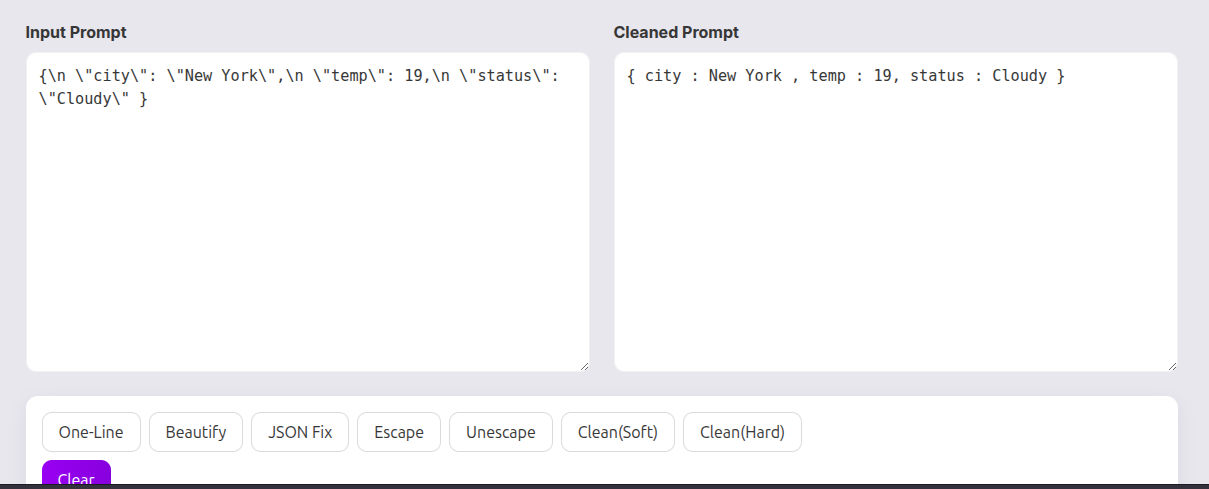
The simplest and fastest solution is using a browser-based AI Prompt Cleaner.
These tools remove:
- ✔
\n - ✔
\t - ✔
\\ - ✔
\" - ✔ Unicode junk characters
- ✔ Extra line breaks
- ✔ Duplicate spaces
- ✔ Broken JSON formatting
No installation. No login. No database.
Step-by-Step: Clean Your AI Prompt
Here’s the easiest way to clean your prompt instantly:
Step 1 — Paste your AI text into the cleaner
Copy the messy output from ChatGPT/Claude/Gemini and paste it.
You may see:
{\n \"name\": \"John\",\n \"age\": 22\n}
Step 2 — Click “Clean Prompt”
The tool automatically:
- removes escape characters
- fixes JSON formatting
- turns multi-line into clean structured format
- removes unwanted spacing
Step 3 — Copy your cleaned text
Now use your clean text in:
- any automation flow
- API calls
- coding projects
- web apps
- chatbot templates
Example: Before & After Cleaning
Before:
{\n \"city\": \"New York\",\n \"temp\": 19,\n \"status\": \"Cloudy\" }
After :
{
"city": "New York",
"temp": 19,
"status": "Cloudy"
}
Clean. Readable. Error-free.
Bonus Features: One-Line Prompt Mode
Some users like to keep their prompt single-lined when working with:
- APIs
- URL parameters
- CLI tools
One of the features that a great cleaner tool has is “One Line Mode” that changes your whole prompt into a concise, API-ready format while still maintaining the integrity of the characters.
Why Use an Online Cleaner Instead of Manual Editing
Manual cleaning takes:
- ❌ time
- ❌ effort
- ❌ and causes mistakes
Online tools provide:
- ✔ Instant cleaning
- ✔ No installation
- ✔ No login
- ✔ Works on any device
- ✔ Accurate formatting
And best of all → 100% free.
Final Thoughts
AI has a lot of power, however, the text that it generates is not always neat. A free AI Prompt Cleaner available online helps in saving the time that would be taken to remove bugs and also it makes sure that the prompts are without errors which can then be used for the daily workflow.
Clean prompts are what will make your AI works to be fast, neat, and of high productivity if you happen to be a developer, writer, researcher, or automation builder.
Leave a Reply